
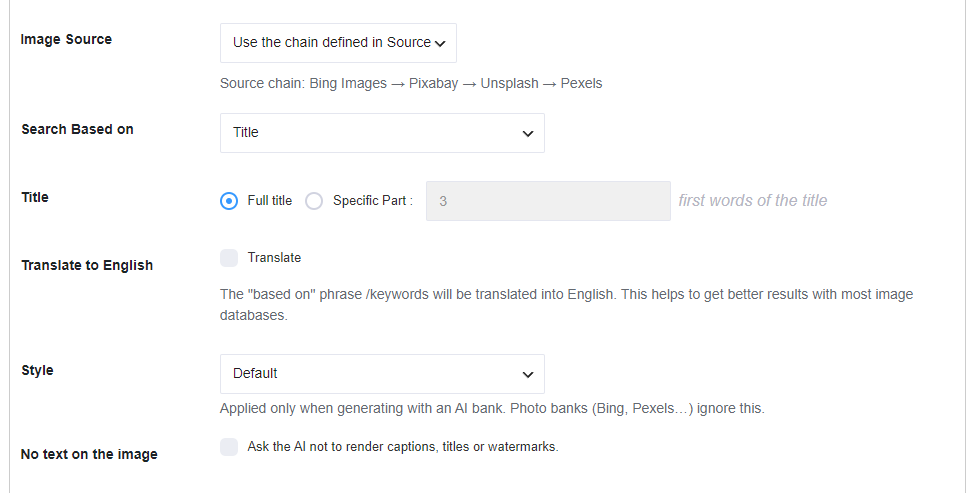
AI style is configured on Automatic → Image Placement (the Style field on each image location). It is not a separate tab and it is not set on Source.
Style changes the prompt sent to generative AI banks. Photo banks (Bing Images, Openverse, Flickr, Pixabay, Youtube, Unsplash, Pexels, Google Image (API)) ignore it.
#
Default prompt #
When Style is Default, the plugin sends:
Photorealistic image of {search}
{search} is the keyword from Search Based on (title, tags, Custom Request, OpenAI Keyword Extractor, and so on).
Presets #
Any other preset replaces the default sentence. The plugin sends {search} and appends that preset’s suffix:
- Default —
Photorealistic image of {search}(no extra suffix) - Photorealistic — photorealistic photography, natural lighting, high detail
- Illustration — digital illustration, clean shapes, vibrant colors
- Oil painting — oil painting, visible brush strokes, rich texture
- Watercolor — watercolor painting, soft edges, paper texture
- Cinematic — cinematic still, dramatic lighting, shallow depth of field
- 3D render — 3D render, octane, studio lighting
- Minimal — minimalist composition, simple shapes, lots of negative space
- Anime — anime style, clean line art
- Custom — uses the Custom style field instead of a preset suffix
#
Custom style #
When Style is Custom, the Custom style field appears. Placeholder: “e.g. editorial product shot, soft daylight”. Description: “Extra instructions appended to the AI prompt.”
The prompt becomes {search}, {your custom style}.
#
No text on the image #
Checkbox No text on the image: “Ask the AI not to render captions, titles or watermarks.” The plugin appends: no text, no letters, no watermark, no caption, no typography.
#
Which banks use this #
Applies to:
Does not apply to Bing Images, Pexels, Unsplash, Pixabay, Flickr, Openverse, Youtube, Google Image (API), First image in content, or Default image.
Custom Request vs Style #
Custom Request (under Search Based on) is the keyword — what the image is about (for example the post title, a category, or “red sports car”).
Style is how it should look (photorealistic, watercolor, your custom instructions). Do not put the subject in Custom style and the look in Custom Request; keep the subject in Search Based on and the look in Style.
Example: Search Based on Title = “Golden retriever puppy”, Style = Oil painting → the AI is asked for a golden retriever puppy as an oil painting. Custom Request “vintage poster of %%Title%%” with Style Default → “Photorealistic image of vintage poster of Golden retriever puppy”.
Enable logs if you need to see the exact prompt that was sent.


