
Configuring Replicate in Source
Pro (you pay Replicate for usage). Replicate runs many text-to-image models through one API key. It generates an image from your keywords — it does not search a photo library. Generation time ranges from a few seconds for popular models to over a minute for slower ones.
Do not duplicate dedicated banks here. Flux 2, Gemini (Nano Banana), Grok and Ideogram each have their own Source bank and their own API key. Use Replicate when you want a model that only exists on Replicate (for example Flux 1.x, Google Imagen 4, or GPT Image 2 via Replicate).
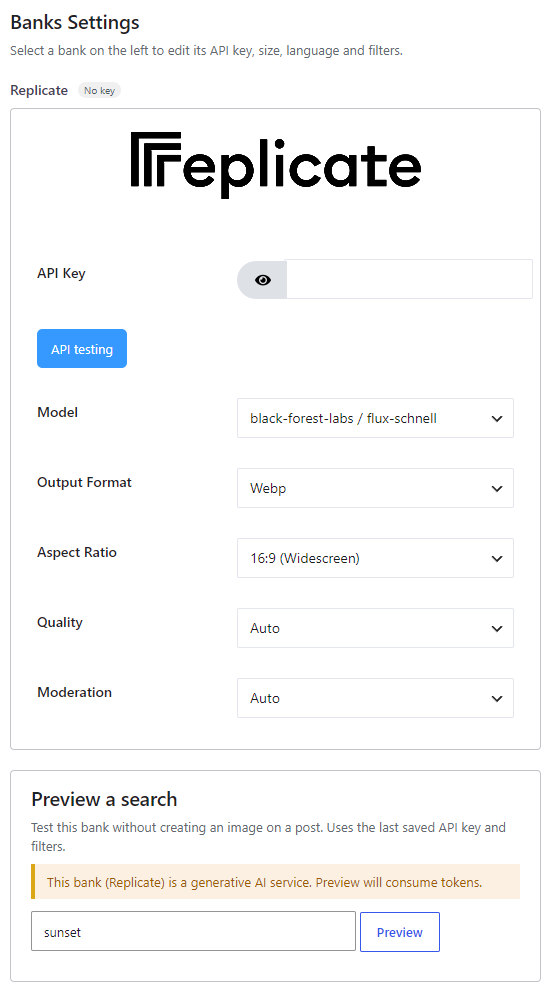
Where to enable it #
Open Source, add Replicate (badge AI, locked as Pro on the free plugin) to the Automatic generation chain, then click Configure. Style presets on Automatic → Image Placement apply when this bank generates. The Gutenberg block cannot search Replicate (photo tabs only).
Get an API key #
Create a key on your Replicate account page. Paste it in the Replicate panel and click API testing. The plugin does not include Replicate credits.
Options #
- API Key — Required. Your Replicate token (not a Black Forest Labs, Google, xAI or Ideogram key).
- Model — Default:
black-forest-labs/flux-schnell(fast and cheap). The list also includes Flux 1.1 Pro / Ultra, Flux Dev / Pro, Recraft v3, ByteDance SDXL Lightning and Seedream 4, Ideogram v2 / v2a (via Replicate), Luma Photon, MiniMax image-01, Google Imagen 3/4 and nano-banana (via Replicate), NVIDIA Sana, OpenAI GPT Image 2 (via Replicate), Stability SD 3.5, AuraFlow, SDXL, Kandinsky, Playground, RealVis, Proteus, and others. Compare quality and cost on the Replicate text-to-image collection. - Output Format — Jpg, Png or Webp (default Webp).
- Aspect Ratio — 16:9 (Widescreen, default), 4:3 (Standard), 1:1 (Square), 3:2 (Photo), 9:16 (Portrait). Applies only to Google Imagen, ByteDance Seedream and OpenAI GPT Image 2. Other models use fixed dimensions.
- Quality — Auto (default), High, Medium or Low. Applies only to OpenAI GPT Image 2 on Replicate.
- Moderation — Auto (default) or Low. Applies only to OpenAI GPT Image 2 on Replicate.
Time, billing and restrictions #
Depending on the model, generation takes from a few seconds to over 1 minute. Previewing this bank on Source consumes Replicate tokens — the plugin warns you and asks for confirmation before an AI preview.
The plugin does not charge per image. Replicate bills the key you enter.


