
Configuring GPT Image in Source
Free (you pay OpenAI for usage). GPT Image replaces DALL·E in Magic Post Thumbnail 7. It generates an image from your keywords — it does not search a photo library. Existing DALL·E API keys still work.
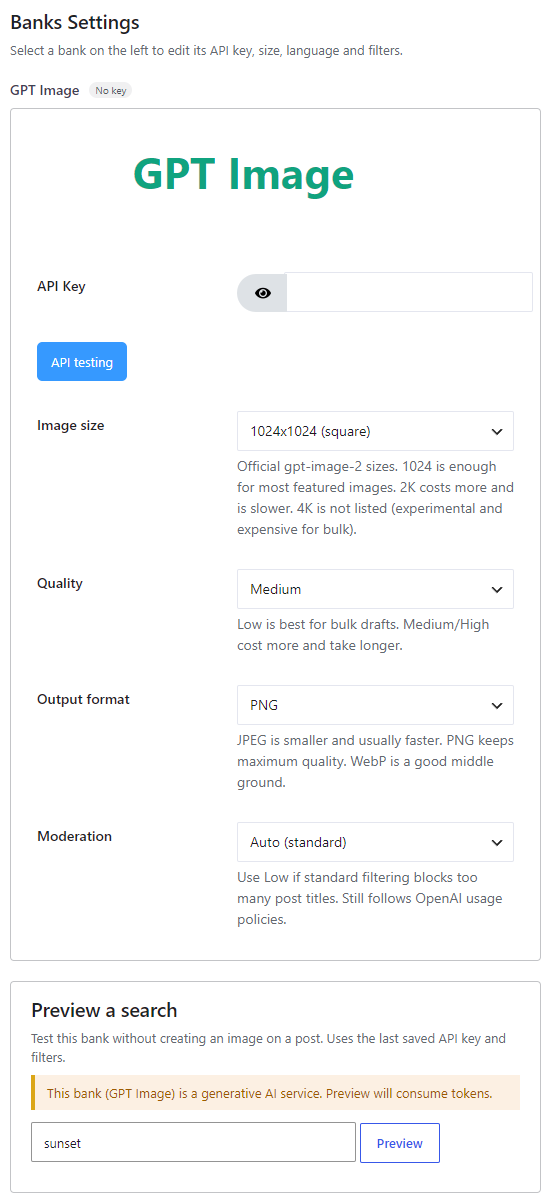
#
Where to enable it #
Open Source, add GPT Image (badge AI) to the Automatic generation chain, then click Configure. Style presets on Automatic > Image Placement apply to this bank only. The Gutenberg block cannot search GPT Image (photo tabs only).
Options #
- API Key — Required. Create a key on the OpenAI API keys page. Existing DALL·E keys still work. Click API testing after entering the key.
- Image size — Auto (model chooses), 1024×1024 (square), 1536×1024 (landscape), 1024×1536 (portrait), 2048×2048 (2K square), 2048×1152 (2K landscape). Official gpt-image-2 sizes. 1024 is enough for most featured images. 2K costs more and is slower. 4K is not listed (experimental and expensive for bulk).
- Quality — Auto, Low (faster, cheaper), Medium (default), High (slower, more expensive). Low is best for bulk drafts.
- Output format — PNG, JPEG or WebP. JPEG is smaller and usually faster. PNG keeps maximum quality. WebP is a good middle ground.
- Moderation — Auto (standard) or Low (less strict). Use Low if standard filtering blocks too many post titles. Requests still follow OpenAI usage policies.
#
Time, billing and restrictions #
Caution: GPT Image can take a long time to generate (often 20 to 90 seconds). OpenAI may require organization verification before GPT Image models work.
GPT Image has content restrictions. See the OpenAI usage policies.
The plugin does not charge per image. OpenAI bills the key you enter. Previewing this bank on Source consumes tokens.


