
Configuring Gemini (Nano Banana) in Source
Pro (you pay Google for usage). Gemini (Nano Banana) is Google’s native image generation. Flash (Nano Banana 2) is the default; Pro (Nano Banana Pro) is higher quality. It generates an image from your keywords — it does not search a photo library.
This is not Imagen 4. Imagen 3/4 stay available via the Replicate bank.
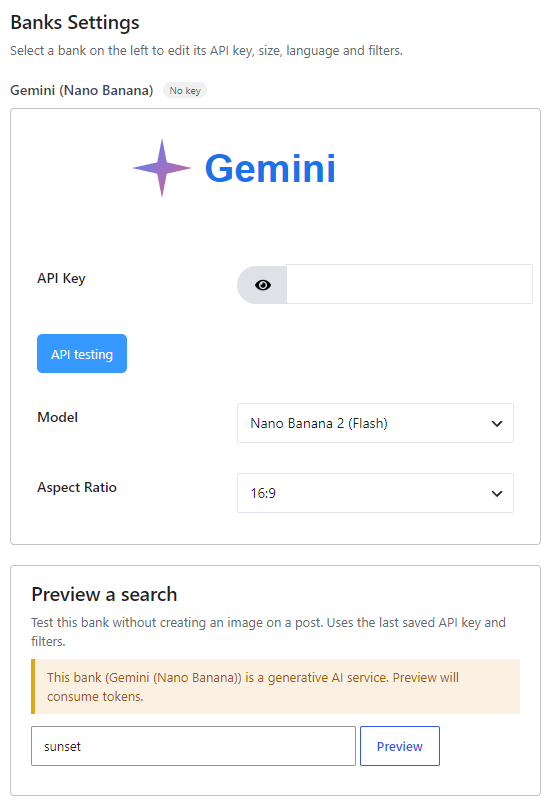
Where to enable it #
Open Source, add Gemini (Nano Banana) (badge AI, locked as Pro on the free plugin) to the Automatic generation chain, then click Configure. Style presets on Automatic → Image Placement apply when this bank generates. The Gutenberg block cannot search Gemini (photo tabs only).
Get an API key #
Create a key in Google AI Studio. Paste it in the Gemini panel and click API testing. This dedicated bank uses your Google AI Studio key — not a Replicate token.
Options #
- API Key — Required. Your Google AI Studio key.
- Model — Nano Banana 2 (Flash) —
gemini-3.1-flash-image(default, faster) — or Nano Banana Pro —gemini-3-pro-image(higher quality). - Aspect Ratio — 1:1, 16:9 (default) or 9:16.
Time, billing and restrictions #
Caution: generation can take 10 to 40 seconds. Generated images include a SynthID watermark.
Previewing this bank on Source consumes Google tokens — the plugin warns you and asks for confirmation before an AI preview. The plugin does not charge per image. Google bills the key you enter.


