Magic Post Thumbnail
  • Pricing
  • Features
  • Docs
  • FAQ
  • Contact
  • Account
  • Blog
  • Buy It
  • English
    • Français (French)
logo
  • Pricing
  • Features
  • Docs
  • FAQ
  • Contact
  • Account
  • Blog
  • Buy It
  • English
    • Français (French)

Documentation

Getting Started

  • What is Magic Post Thumbnail ?
  • Requirements

Setup the plugin

  • Dashboard
  • Settings : Source
  • Settings : Automatic
  • Settings : Gutenberg Block
  • How to use Magic Post Thumbnail

Image Databases

  • GPT Image
  • Pixabay
  • Bing Images
  • Grok
  • Gemini (Nano Banana)
  • Flux 2
  • Ideogram
  • Replicate
  • Default image
  • First image in content
  • Google Image (API)
  • Stable Diffusion
  • Unsplash
  • Pexels
  • Flickr
  • Openverse
  • Youtube

Pro Features

  • Upgrade from free to Pro version
  • Compatibility
  • Cron
  • Proxy

Miscellaneous

  • Rights
  • Affiliation
  • AI style and custom prompts
  • Logs

Support

  • Account
  • Problems with Pro Plugin
  • Getting help
  • FAQ & Commons Problems
  • Help the plugin
View Categories
  • Home
  • Docs
  • Image Databases
  • Pexels

Pexels

1 min read

Pexels is a royalty-free photo library. You must provide your own Pexels API Key.

Pro. This bank is locked on the Free plan (Pro badge on Source).

Source badge: Photos.

Gutenberg: yes. Enable it as a search tab on Magic Post Thumbnail → Gutenberg Block. API keys and filters stay on Source.

Open the bank in Source #

In version 7, banks are configured from Magic Post Thumbnail → Source. Click the bank in the left column (or tick it to add it to the chain), then click Configure. The Banks Settings panel opens on the right. Save when you are done.

The left column is the Automatic generation chain used by the editor button, bulk generation, cron and imports. Drag to set priority: the first bank is tried first. Unchecked banks sit below the chain.
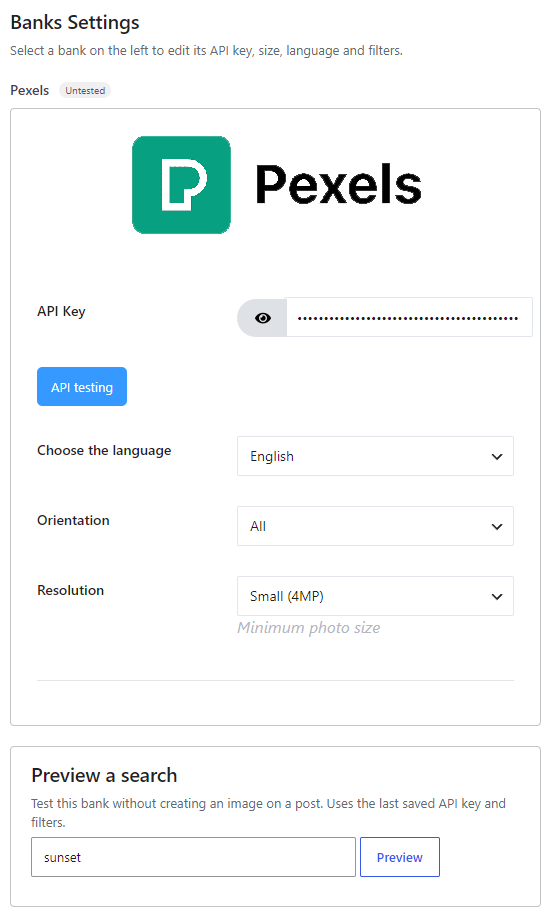
Pexels bank settings

Get an API key #

  1. Register at Pexels.
  2. Create an API application at Pexels API.
  3. Paste the API key into the Source panel, click API testing, then Save.

Options #

  • API Key — required.
  • Choose the language — default English (en-US). Also Czech, Danish, German, Spanish, Catalan, French, Indonesian, Italian, Hungarian, Dutch, Norwegian, Polish, Portuguese, Romanian, Slovak, Finnish, Swedish, Turkish, Vietnamese, Thai, Russian, Ukrainian, Greek, Japanese, Korean, Chinese, Chinese (Taiwan).
  • Orientation — All, Landscape, Portrait, Square.
  • Resolution — minimum photo size: Small (4MP), Medium (12MP), Large (24MP). Small is usually enough. Higher minimums reduce the number of matches.
What are your Feelings

Share This Article :

  • Facebook
  • X
  • LinkedIn
  • Pinterest
Updated on 16 August 2026
UnsplashFlickr
Table of Contents
  • Open the bank in Source
  • Get an API key
  • Options
MPT-logo

You can donate for the free version with Paypal & Bitcoin

Bitcoin logo bc1qwchwnm6ch78futjlg3jeu6dznnapqpaarckaf6 Magic Post Thumbnail Youtube Channel
2026 © All rights reserved - Affiliation - Legal Notice - Privacy Policy