
Configuring Ideogram in Source
Pro (you pay Ideogram for usage). Ideogram generates images from your keywords and is especially strong at text inside images (posters, titles, logos). Commercial use follows your Ideogram API plan. It generates an image — it does not search a photo library.
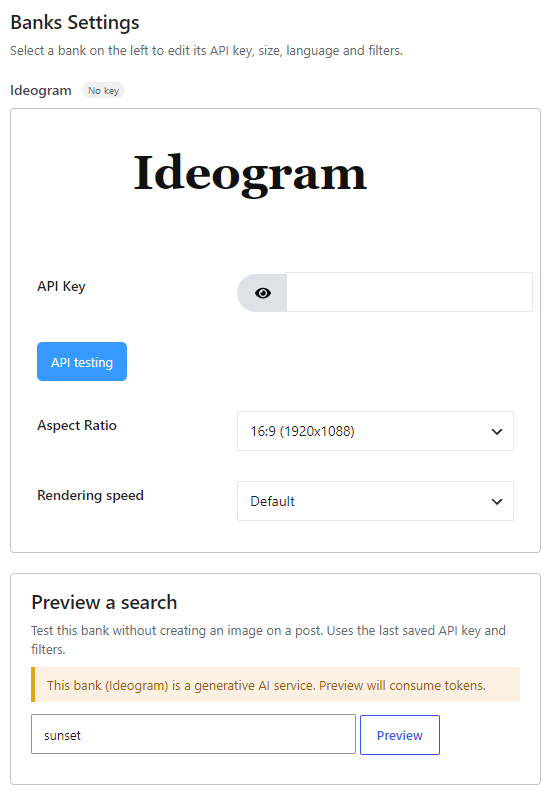
Where to enable it #
Open Source, add Ideogram (badge AI, locked as Pro on the free plugin) to the Automatic generation chain, then click Configure. Style presets on Automatic → Image Placement apply when this bank generates. The Gutenberg block cannot search Ideogram (photo tabs only).
Get an API key #
Create a key on the Ideogram developer site. Paste it in the Ideogram panel and click API testing. This dedicated bank uses your Ideogram key — not a Replicate token. (Ideogram models also exist under the Replicate bank if you prefer that token.)
Options #
- API Key — Required. Your Ideogram developer key.
- Aspect Ratio — 1:1 (1024×1024), 16:9 (1920×1088, default) or 9:16 (1024×1792).
- Rendering speed — Default (better quality) or Turbo (faster, cheaper).
Time, billing and restrictions #
Caution: generation usually takes a few seconds. Image URLs from the Ideogram API expire; Magic Post Thumbnail downloads them immediately into your Media Library.
Previewing this bank on Source consumes Ideogram tokens — the plugin warns you and asks for confirmation before an AI preview. The plugin does not charge per image. Ideogram bills the key you enter according to your API plan.


