
Stable Diffusion generates images through the Stability AI API. You must provide your own API key. Generation usually takes 4 to 12 seconds.
Pro. This bank is locked on the Free plan (Pro badge on Source).
Source badge: AI.
Gutenberg: not available as a block search tab. Photo-bank tabs in Gutenberg are Openverse, Flickr, Pixabay, and (Pro) YouTube, Unsplash and Pexels. Google Image (API) and AI generators are Source / automatic generation only.
Open the bank in Source #
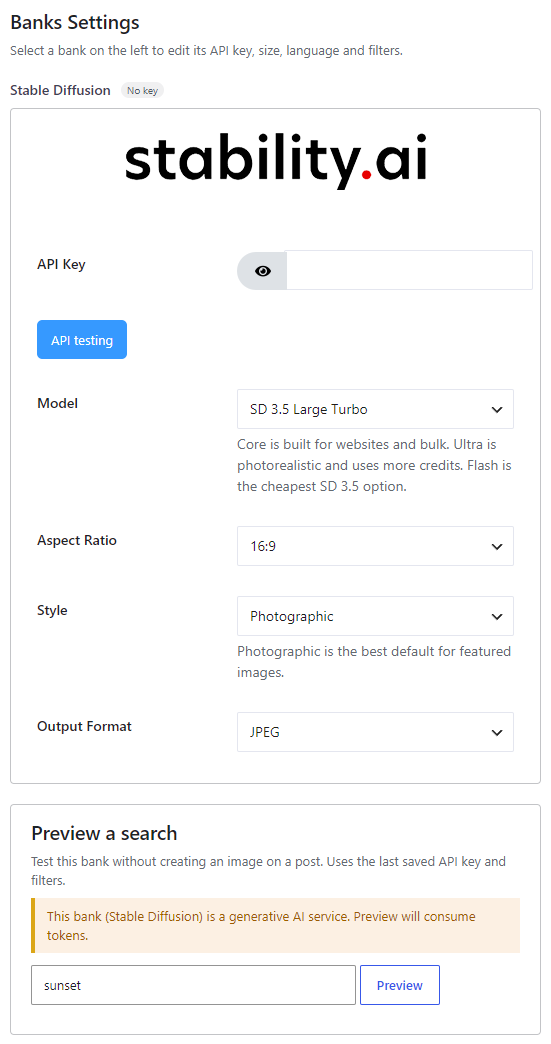
In version 7, banks are configured from Magic Post Thumbnail → Source. Click the bank in the left column (or tick it to add it to the chain), then click Configure. The Banks Settings panel opens on the right. Save when you are done.
The left column is the Automatic generation chain used by the editor button, bulk generation, cron and imports. Drag to set priority: the first bank is tried first. Unchecked banks sit below the chain.
Get an API key #
- Create a key at https://platform.stability.ai/account/keys.
- Paste it into the Source panel, click API testing, then Save.
Style presets from Automatic still apply to this AI bank.
Source Preview a search can consume credits on AI banks. Use a cheap model while testing.
Model #
Default: Stable Image Core.
- Stable Image Core — fast, recommended. Built for websites and bulk. Fastest / cheapest of the current Image models for volume.
- Stable Image Ultra — best quality. Photorealistic; uses more credits.
- SD 3.5 Large Turbo
- SD 3.5 Flash — cheapest SD 3.5 option.
- SD 3.5 Large
- SD 3.5 Medium
Other options #
- Aspect Ratio — 16:9 (default), 3:2, 1:1, 4:5, 5:4, 2:3, 9:16, 21:9, 9:21.
- Style — None, Photographic (default — best for featured images), Cinematic, Digital art, Enhance, Anime.
- Output Format — JPEG (default), PNG, WebP.


