
Pixabay is a royalty-free photo bank. You must provide your own username and API key.
Free. Available on the Free plan.
Source badge: Photos.
Gutenberg: yes. Enable it as a search tab on Magic Post Thumbnail → Gutenberg Block. API keys and filters stay on Source.
Open the bank in Source #
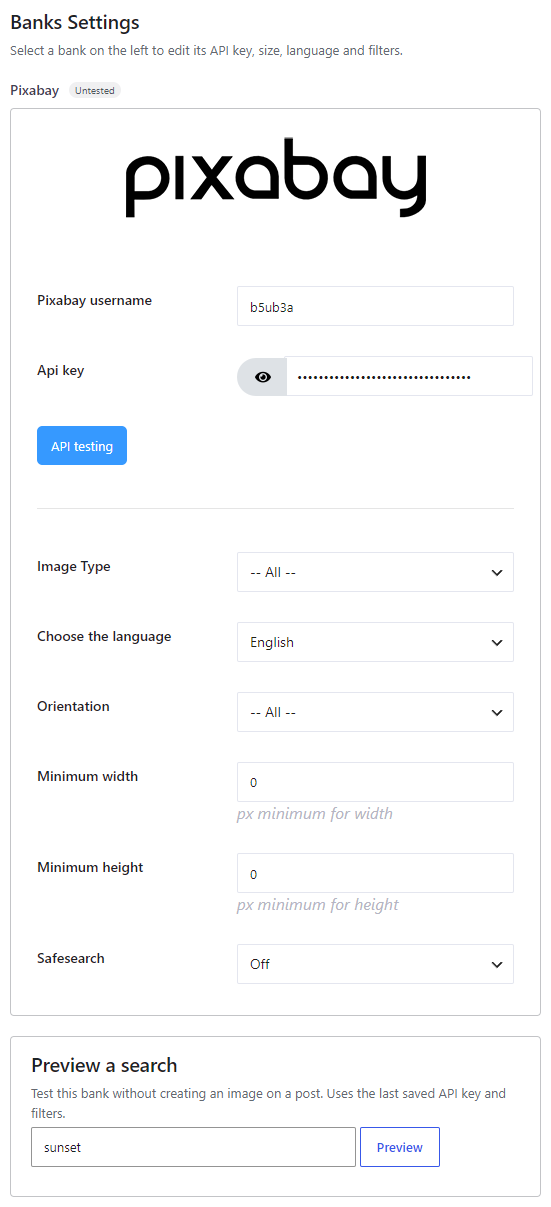
In version 7, banks are configured from Magic Post Thumbnail → Source. Click the bank in the left column (or tick it to add it to the chain), then click Configure. The Banks Settings panel opens on the right. Save when you are done.
The left column is the Automatic generation chain used by the editor button, bulk generation, cron and imports. Drag to set priority: the first bank is tried first. Unchecked banks sit below the chain.
Get a username and API key #
- Register at Pixabay.
- Open the Pixabay API documentation while logged in. Your username and API key are listed there.
- Paste both into the Source panel, then click API testing to verify the key. Save.
Options #
- Pixabay username — required.
- Api key — required.
- Image Type — All (default), Photo, Illustration, Vector image. All and Photo usually return more results; Illustration and Vector image can be thinner.
- Choose the language — Czech, Danish, German, English, Spanish, French, Indonesian, Italian, Hungarian, Dutch, Norwegian, Polish, Portuguese, Romanian, Slovak, Finnish, Swedish, Turkish, Vietnamese, Thai, Bulgarian, Russian, Greek, Japanese, Korean, Chinese. Match the language of your content.
- Orientation — All (default), Horizontal, Vertical.
- Minimum width — pixels (0 = no minimum).
- Minimum height — pixels (0 = no minimum).
- Safesearch — Off (default), Active.


